
Planning a guest list sounds simple until the replies start coming in. One person says yes in a text, someone else tells your mom they will “probably make it,” and another guest reacts with a heart but never actually answers. A week later, you are scrolling through messages trying to remember who confirmed, who declined, and who still needs a follow-up.
That is where an invitation with RSVP becomes genuinely useful. Instead of sending the invitation first and chasing everyone later, you can let guests respond when they open it. With TwistInvite, they can choose Going, Can’t make it, or Maybe, fill in their details, and submit their response without creating an account.
You send the invitation. Your guests answer for themselves. It is much easier than turning your chats into a guest list. When you are ready to try it, you can create a video invitation with RSVP from a template.

Quick Answer: Why Use an Invitation With RSVP?
Inviting people and managing their replies are two parts of the same job. A digital invitation with RSVP lets every guest see the event and respond in one place, so the host spends less time asking who is coming.
- Share one invitation with the guests you want to invite.
- Collect Going, Can’t make it, or Maybe responses.
- Gather guest names and email addresses through the RSVP form.
- Keep responses together instead of scattered across messages.
- Let guests respond without creating an account.
- Combine RSVP with video, photos, or your own voice.
- Return to the invitation link after the event.
Stop Asking “Are You Coming?” Over and Over
If you are inviting ten people, keeping track manually may not feel like a big deal. If you are inviting 80, 120, or 150 people, the same approach becomes much harder. Replies end up everywhere: someone texts you, someone calls, a relative tells another relative, and somebody says “I think so” without ever confirming.
Eventually, your phone becomes the guest-management system. An RSVP invitation gives everyone one obvious way to answer instead. Guests do not need to wonder whether they should call, reply to a group chat, or tell your parents; they open the invitation and choose Going, Can’t make it, or Maybe. That alone makes the guest list much easier to understand.
One Invitation, Shared With the People You Want to Invite
A physical invitation usually means preparing and delivering a card for every household. That can be lovely, especially if paper stationery is an important part of the event, but it also involves printing, envelopes, addresses, postage, and waiting for everything to arrive.
A digital invitation works differently. You create it once, then share the same experience with your guests by text or link. This is especially useful when people live in different cities or countries, or when the event is approaching quickly and you do not want the invitation itself to become a shipping project. For a broader overview of the format, see how to make a digital invitation guests actually want to open.
Guests Can Tell You Exactly Where They Stand
“Yes” and “no” are not the only real-life answers. Some guests may still be waiting on work schedules, flights, childcare, school, or another commitment. That is why TwistInvite includes Maybe alongside Going and Can’t make it. Instead of guessing what “I’ll let you know” means, you can see that someone has not decided yet.
After choosing a status, guests continue into the RSVP form. Name and Email are required, while Phone, Message, and Number of Guests provide additional planning information. You are not receiving a vague “yes”; you are collecting the details needed to understand who the response belongs to. Read how online invitations with RSVP work for a more detailed look at response planning.
Guests Do Not Need to Create an Account
This matters more than it sounds. Imagine sending your wedding invitation to an aunt, an old roommate, your manager, and your grandparents, then telling everyone they need to create a new account before they can answer. That adds friction at the exact moment when the response should feel simple.
With TwistInvite, guests can open the invitation and RSVP without creating an account. They see the invitation, choose a response, complete the form, and submit. The host may care about the technology behind the invitation; guests mostly want to know where to tap.
Record One Voice Message Instead of Repeating Yourself
Inviting a large group often means repeating the same message. You may want everyone to hear something warm, such as “We really hope you can make it,” or something practical, such as “The ceremony starts at four, so please arrive a little early.” You may also want the invitation to feel more personal than a designed card.
With TwistInvite Custom, you can import your own audio or use Hold to Record to record your voice directly into the invitation. Record the message once, then every guest who receives the invitation can hear it when they open the link. TwistInvite does not include a built-in music library, so any music should come from audio you import and have the right to use. A short sentence in your own voice can often add more warmth than another paragraph of invitation wording.
Your Own Video Can Make the Invitation Feel Even More Personal
The same idea applies to video. With TwistInvite Custom, you can add your own video as part of the invitation, whether that is a short proposal clip, a birthday memory, the venue at sunset, a child playing before a birthday party, or footage that matches the feeling of the celebration.
The invitation still gives guests the practical information they need, but it now carries something that came directly from you. That is where a digital invitation stops feeling like a generic card and starts feeling much more like your event. For planning and design guidance, follow the steps in How to Make a Video Invitation.
RSVP First, Beauty Too
A video invitation is more visual than a plain RSVP form, but beauty is not the only reason to use it. The practical sequence comes first: invite people → collect responses → know who is coming. Video, photography, animation, and audio then make that useful process feel more personal and enjoyable.
You do not have to choose between something useful and something beautiful. A good digital invitation can do both: it helps guests understand what to do while giving them a memorable first impression of the event.
Paper Invitation vs. Video Invitation With RSVP
Paper has a tactile quality that digital cannot replace, but a video invitation with RSVP connects the invitation and guest response in one flow. The practical differences are easier to see side by side.
| Consideration | Paper Invitation | Video Invitation With RSVP |
|---|---|---|
| Sending | Print and mail or hand-deliver | Share by text or link |
| Guest reply | Usually collected separately | Built into the invitation flow |
| RSVP choices | Depends on a separate system | Going / Can’t make it / Maybe |
| Guest details | May need manual tracking | Collected through the RSVP form |
| Personal voice | Not normally part of the card | Can include your own recorded audio |
| Video | No | Can include video and personal media |
| Updates | Difficult after printing | Digital format is more flexible |
| After the event | A physical keepsake | The link can remain available as a digital memory |
Paper still offers a physical object you can hold and keep. If your biggest challenge is guest coordination, however, a digital invitation with RSVP handles much more of the planning process for you. For a fuller format comparison, read Digital Invitation Card vs. Paper Invitation.
The Invitation Can Still Be There After the Event
A paper invitation can become a beautiful keepsake, while a digital invitation can preserve memories in a different way. Your TwistInvite link does not have to disappear when the party is over, so you can return to it afterward, especially if it includes your own video, photographs, voice, or a design created specifically for that celebration.
Before the event, the invitation says, “Come celebrate with us.” Afterward, it can become a small record of what that moment felt like. It is a different kind of keepsake, but it is still a keepsake.
How Does RSVP Work for Guests?
The process should feel obvious from the moment a guest opens the link. A well-designed invitation does not require instructions; it simply leads the guest from the event experience to a clear response.
Open the invitation
The guest taps the shared text or link and views the video invitation.
Create it in the TwistInvite app
Download free on iPhone or Android, then share one link with your guests.
Explore the details
They review the date, time, location, and other event information.
Choose an RSVP status
They select Going, Can’t make it, or Maybe.
Complete the form
They enter the requested details and submit their response.
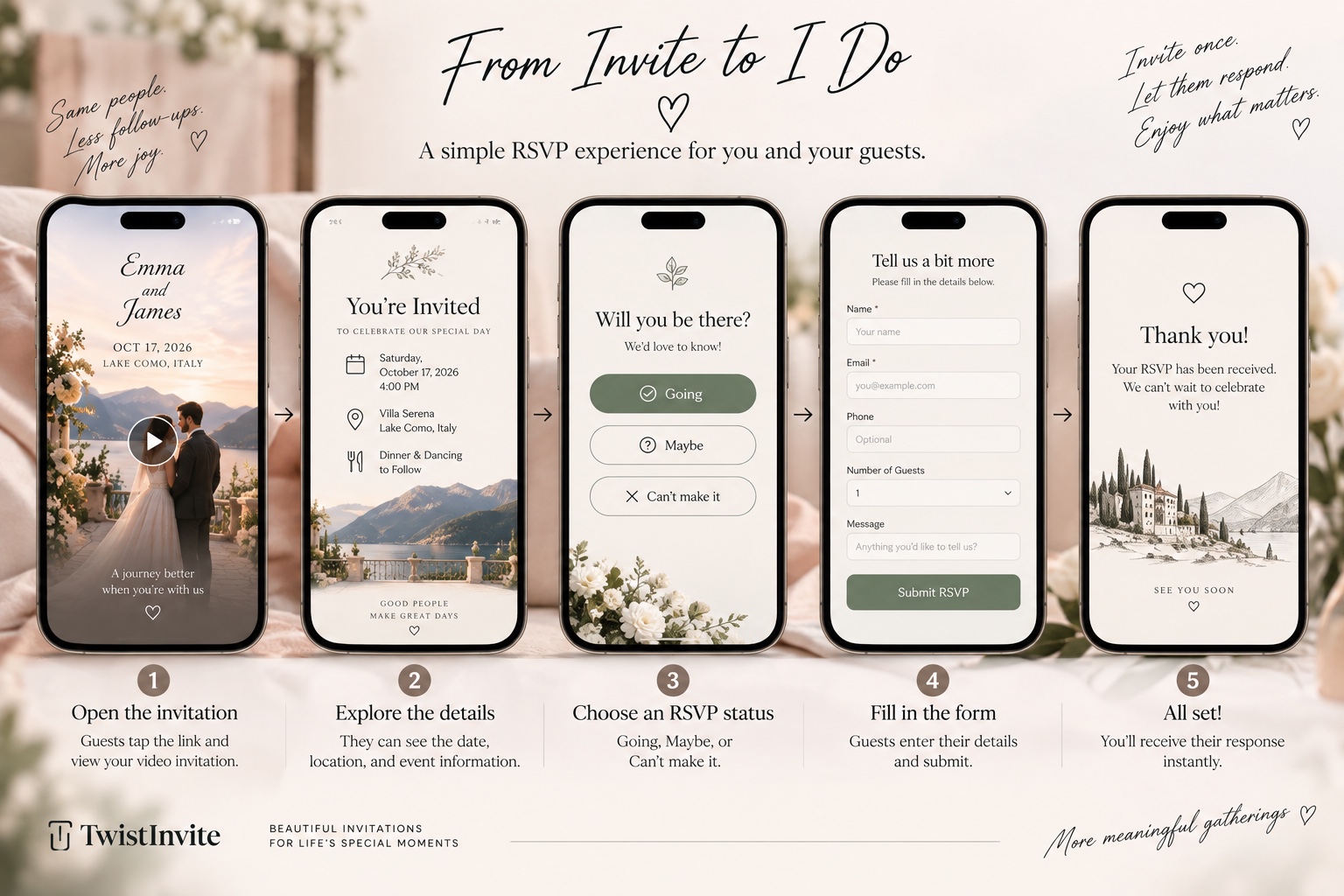
Once the form is submitted, the response is complete. No new guest account is required, and the host receives a clear answer instead of another message to interpret.
What Events Are Video Invitations With RSVP Good For?
Weddings
Wedding planning may involve dozens or hundreds of guests, along with travel, partners, seating, and other decisions that depend on attendance. A polished digital wedding invitation can introduce the atmosphere while making the response step easy to find.
Birthday Parties
For milestone birthdays, dinners, children’s parties, or larger celebrations, RSVP gives you a much better idea of how many people to prepare for. A digital birthday invitation can still feel playful or expressive without losing the practical guest-count step.
Baby Showers
If you are arranging food, gifts, seating, games, or a venue, knowing the guest count is much easier than relying on casual messages.
Engagement Parties and Anniversaries
These events often sit somewhere between a casual gathering and a formal celebration. A digital invitation can keep the experience beautiful while still making replies easy.
Private Dinners and Special Events
Any time headcount affects the venue, food, seating, or planning, RSVP has a real job to do. The event does not need to be large for a clear response flow to be useful.
Can You Use Video Invitations With RSVP for Free?
Yes. TwistInvite is free to start. The current Free plan costs $0 and includes up to 3 events per month, 15-second video messages, beautiful free templates, RSVP tracking, and sharing by text or link. Guests can open invitations and RSVP without creating an account.
If you later want Premium access, TwistInvite also offers weekly, monthly, and annual plans.
| Plan | Price | Renewal |
|---|---|---|
| Free | $0 | No paid renewal |
| Premium — weekly | $2.99/week | Renews weekly until canceled |
| Premium — monthly | $8.99/month | Renews monthly until canceled |
| Premium — annual | $39.99/year | Renews annually until canceled |
Premium subscriptions are managed through your App Store or Google Play account, and full terms are shown before purchase. Prices are shown in USD; the actual price in your region appears on the App Store or Google Play purchase page. You can begin creating an invitation and trying the RSVP experience before deciding whether to upgrade. See the current TwistInvite pricing for plan details, or learn what to compare in a free digital wedding invitation with RSVP.
A Few Things That Make RSVP Work Better
Make the RSVP action easy to find instead of hiding it behind several screens. Keep the date, time, and location clear, too; a beautiful invitation is useful only when guests can understand the essential event information without replaying a detective game.
If you add audio or video, use it to make the invitation more personal rather than burying the practical details. A simple rule keeps the balance right: the invitation can be expressive; the RSVP should be effortless.
Frequently Asked Questions
What is a video invitation with RSVP?
It is a digital invitation that combines a video or animated invitation experience with a way for guests to respond online.
Can guests RSVP directly through TwistInvite?
Yes. Guests can select Going, Can’t make it, or Maybe and then complete the RSVP form.
Do guests need an account?
No. Guests can open the invitation and submit their RSVP without creating a TwistInvite account.
What information does the RSVP form collect?
The current form requires Name and Email. It also includes fields for Phone, Message, and Number of Guests.
Can I record my own voice in the invitation?
Yes. TwistInvite Custom includes audio options, including Hold to Record, so you can record your own message.
Can I use my own video?
Yes. TwistInvite Custom lets you add your own video as part of the invitation experience.
Can I share the invitation by text?
Yes. TwistInvite invitations can be shared by text or link.
Does the invitation disappear after the event?
The invitation link can remain available after the event, so you can return to it later.
Is TwistInvite free?
TwistInvite is free to start. The Free plan includes up to three events per month, 15-second video messages, free templates, RSVP tracking, and sharing by text or link.
Invite Them Once. Let Them Answer.
A beautiful invitation is valuable, but when you are planning an event with dozens or even hundreds of people, the real relief comes from knowing who is actually coming without asking the same question again and again. A video invitation with RSVP lets you share the experience once, collect answers in one place, and include your video or voice without losing the practical details. It is more than a pretty digital card: it helps you invite people and organize the celebration at the same time.
Explore the TwistInvite Video Invitation Maker or see how the Online RSVP Website works. TwistInvite is free to start.