






✦ New · iPhone Duo experience

An invitation
that unfolds
with you.

Create custom video invitations and digital invitations with easy RSVP. Add photos or videos, customize your design, and share a memorable invitation with your guests in minutes.

Create your invite free

★★★★★ Beautiful invitations, made personal

The closed iPhone Duo with a full-screen Christmas envelope

Preparing your invitation…

A little anticipation. A beautiful beginning.

Drag the device to look around · RSVP is a local demo

Video invitations

Bring your invitation to life.

Easy RSVP

A simple way to say “I’m in.”

Beautiful templates

A little magic for every occasion.

Share instantly

One link. All your favorite people.

The iPhone Duo experience

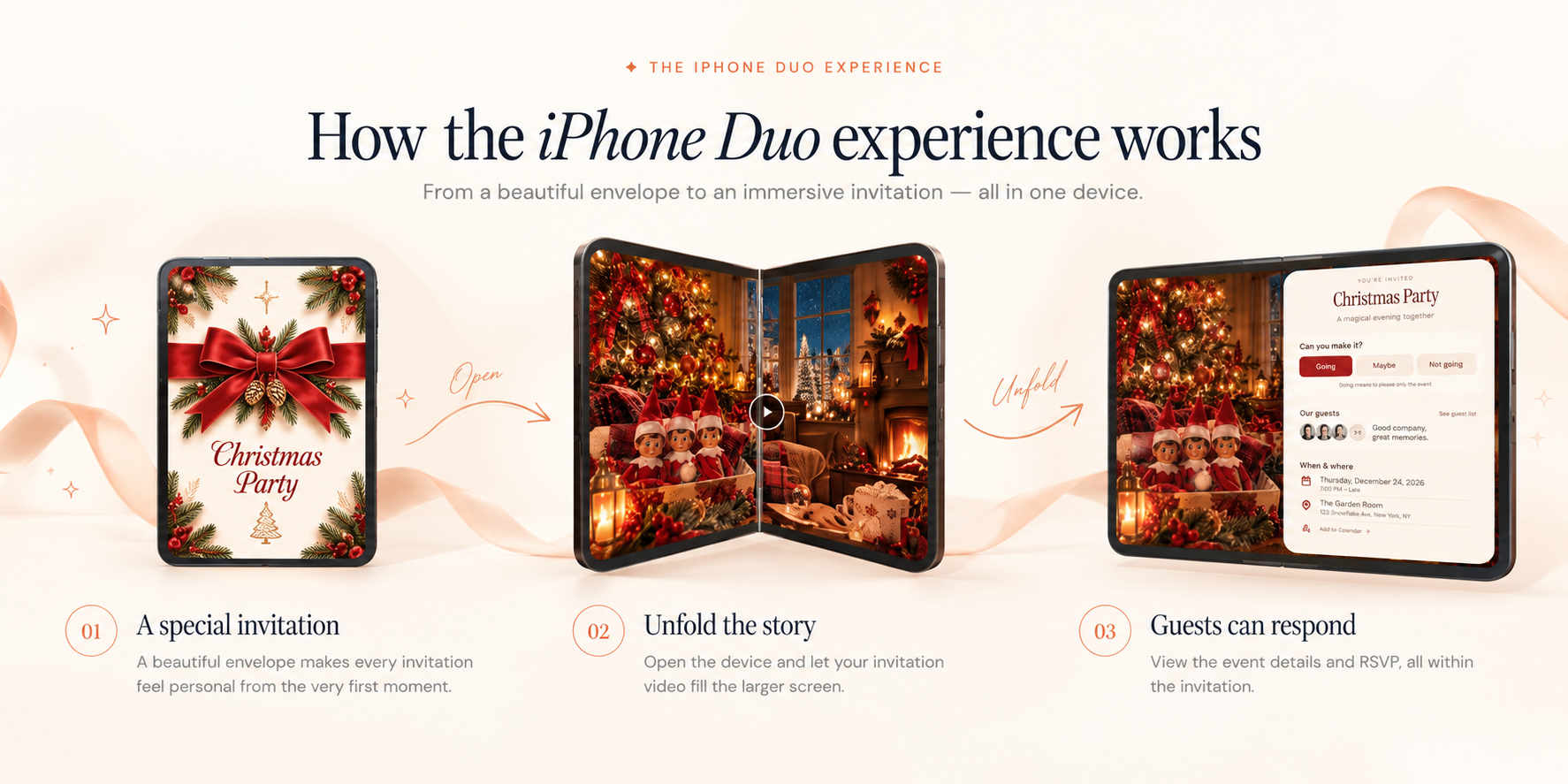
How the iPhone Duo experience works

From a beautiful envelope to an immersive invitation — all in one device. Here’s how to make video invitations on iPhone Duo.

  1. A special invitation

    A beautiful envelope makes every invitation feel personal from the very first moment.

  2. Unfold the story

    Open the device and let your invitation video fill the larger screen.

  3. Guests can respond

    View the event details and RSVP, all within the invitation.

Only on a foldable

Close your phone.
Open your invitation.

Fold it. The envelope opens. Unfold it, and the invite fills both screens. Opening an invitation became fun — not just another invitation app.

  • Close to openClose the phone, and the envelope seals and opens — like a real envelope, only on a foldable.
  • Fills both screensUnfold it, and the invitation fills both screens.
  • Filmed on iPhone DuoThe fold action is fully on camera.

Close your phone. Open your invitation.
Edit on one screen, preview on the other.
Create

Edit on one screen, preview on the other.

Make a Thanksgiving invitation on the big unfolded iPhone Duo screen. Edit on the left, and a live preview stays on the right — much easier than on a normal phone.

  • Pick a themeChoose an invite type and browse a Thanksgiving theme gallery.
  • Edit beside the previewChange the wording and colors next to a live preview.
  • Add a background and musicFinish the invitation on the same unfolded screen.
Share

Guests RSVP with no account.

Share the invite link. Guests unfold the envelope, then RSVP in the browser — no app to download, and no account or verification.

  • Unfold to open the inviteGuests open the envelope the same way — by unfolding the phone.
  • Share the invite linkSend it from the share sheet to the thread you already use.
  • RSVP with no accountGuests reply in the browser. Email is optional.
Share the link. Guests RSVP with no account.
Full walkthrough

Watch the full walkthrough.

A silent clip, filmed on iPhone Duo, from the first template through share and RSVP.

  1. Pick a template
  2. Close to open the envelope
  3. Dual-screen editing
  4. Share and RSVP
The complete walkthrough: template, close to open, dual-screen editing, share and RSVP.

More than a video

Everything you needfor the perfect invitation.

TwistInvite combines beautiful design, immersive videos, and simple RSVP tools to make every event unforgettable.

Explore all features

Custom video or photos

Tell your story your way

Beautiful templates

Designed for every occasion

Event details

Date, time, location and more

Guest list & RSVP

See who’s coming in real time

Beautiful templates for every occasion

A little inspiration for whatever you’re celebrating.

Ready to create your invitation?

Make something beautiful. Bring your favorite people together.

Create your invite free

A little Christmas magic

Can you make it?

We’d love to celebrate with you.

Try the demo · No response is sent